Ten wordpress plugins for improve User interactivity

When you are developing the website or blog using wordpress. You need to think about readers experience on your website. Keeping user experience in mind I created the list of wordpress plugins which are very useful for user interactivity and experience.


Ten wordpress plugins for improve User interactivity and experience

1. WP-Print

This Plugin displays a printable version of your blog when the reader requests for it. The user can directly take a print out from it. The documentation can be found here.

There is also another print widget by HP. This adds a print option to your blog posts. This plugin is available for WordPress and Movable type. This plugin can also convert blog posts into PDF files.

Download WP-Print

2. Convert to PDF

Converting your blog posts into PDF is useful when your blog has more content on tutorials and tips & tricks. Amit has written a post on how to save the blog posts to PDF file. Adding a “Save as PDF” button is really simple process. All you need is to add this link at the end of blog posts (for WordPress users).

http://savepageaspdf.pdfonline.com/pdfonline/pdfonline.asp?cURL=php the_permalink();?>

Blogger users can update the cURL link with the post permalink. This generates a PDF file which can be saved to hard disk.

3. Related Posts

As the name indicates, this plugin will show the related entries for a particular post based on keyword matching.

Download Related Posts

4. WP-Email

This Plugin helps readers to share posts on blogs which they liked with their friends or even to their email. The plugin is easy to use and configure. The documentation can be found here.

Download WP-Email

5. Subscribe to Comments

Subscribe to Comments 2.1 is a plugin that allows commentators on your blog to check a box before commenting and get e-mail notification of further comments. This is useful to have a good discussion going on in your posts.

Download Subscribe to Comments

6. Popular Contest / Top Posts by Category

Popularity contest will help you see which of your posts are most popular and the Top posts plugin displays your top rated posts categorywise based on comments or page views.

Download Top Posts by Category

7. Related posts in your Feed

This WordPress plugin adds a list of Related Posts to your full text feed. For this plugin to work properly you need Related Posts plugin or Ultimate Tag Warrior

plugin activated.

Download Related posts in your Feed

8. qTranslate

Ten wordpress plugins for improve User interactivity

Multilingual support is one of the biggest missing features of WordPress, but with qTransalate you can easily accomplish the task of managing different languages for your blog site.

http://www.qianqin.de/qtranslate/

9. Contact Form 7

Even though there are tens of contact form plugins out there, I’ve always liked Contact Form 7. The problem with most contact form plugins is that either they are too simple or way too complex. Contact Form 7, on the other hand, is extensible yet easy-to-use. It supports Ajax-powered submitting, multiple forms, CAPTCHAS, and Akismet spam filtering.

http://wordpress.org/extend/plugins/contact-form-7/


10. Display Thumbnails For Related Posts in WordPress

by adding thumbnails to related posts using the popular YARPP plugin and WordPress custom fields
http://buildinternet.com/2009/07/display-thumbnails-for-related-posts-in-wordpress/

top 10 social media twitter tools for marketing

Twitter become very popular in past few years and now it has been used by freelancers, designers, programmer, social media company, printing company. There are lot of third party twitter tools developed by many developers and companies.

top 10 social media twitter tools for marketing

Here we have list of top 10 social media twitter tools for marketing. Twitter become popular in few years and now it has been used by social media company.

I collected the information about twitter tools. Using this information you can collect the who is followers, track visitors – who is following, not following, deadbeat users, clean your account.

Tweetmeme

Find most popular links in Twitter, sorted in categories.

Twuffer

Twuffer allows the Twitter user to compose a list of future tweets, and schedule their release.

Twiddict

Twiddict sends your tweets to Twitter even if it’s down.

Twitpic

Upload and share photos on Twitter.

Twitter Feed

Add RSS feeds and it automaticcly posts the headlines to Twitter.

TweetBeep

Get regular updates to your email with conversation trackings, mentions, followers. You can even keep track of who’s tweeting your website or blog.

Friend or Follow

Useful and easily usable tool to see who’re you following, that’s not following you back and conversely.

Tweepler

Tweepler is a much needed and more intuitive way of processing your Twitter followers. It allows you to quickly browse trough people you might be interested in, then follow or ignore them.

Twit Cleaner

Analyses the people you follow, identifies the time wasters, spammers, bots & those who’ve quit Twitter.

Twitter Analyzer

Analyze someone’s tweet stats, popularity, reach, hashtags, subjects and more.


Microblogging Applications for wordpress

Here we have provided list of Microblogging Applications for wordpress. In some years micro blogging became so popular these days. So here we discussed about micro blogging application.

HootSuite

Microblogging Applications for wordpress

HootSuite is the professional microblogging client. With HootSuite, you can manage multiple social network accounts in one easy to use interface, schedule updates, and measure your success.

Learn more | Sign up

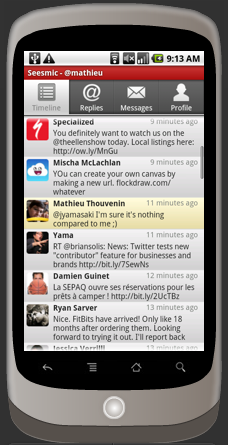
Seesmic for Android

Seesmic now offers the microblogging client you’ve been waiting for! A powerful feature-rich application that’s simple and easy to use. Stay connected and share information with your friends from everywhere. Now with support for posting to WordPress.com.

Learn more | Download

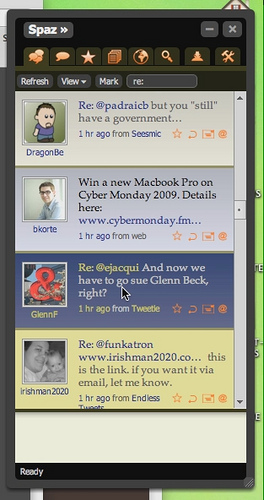
Spaz

Spaz is an open source, cross-platform app for Twitter, Identi.ca and Laconica. With built-in global search, short URL creation, and support themes, Spaz also works for posting and reading WordPress.com blogs.

Learn more | Download

Twidroid

Twidroid is the industry-standard Twitter client for Android and among the most used Twitter applications across all platforms. It’s available as a free and commercial pro version that supports all Twitter features as well as functionality that is customized to the capabilities of Android devices. Twidroid supports posting to and reading WordPress.com blogs.

Learn more | Download

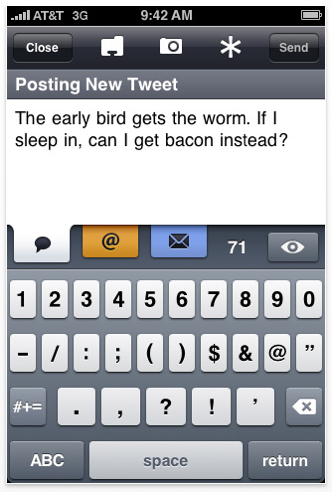
Twitterrific

Twitterrific is a fun application that lets you both read and publish posts or “tweets” to the Twitter community website. The application’s user interface is clean, concise and designed to take up a minimum of real estate. With Twitterrific you can enter a WordPress.com account to post updates and read blogs you’re following.

Learn more | Download

Mobile application for wordpress

WordPress launched best mobile applications. Here we collected a unique list of mobile application for wordpress. which will be useful for every wordpress users. Mobile applications are becoming so much popular these days. So we have given some mobile application list.

Mobile application for wordpress

WordPress for Android

Mobile application for wordpress

Write new posts for your WordPress.com or self-hosted WordPress.org blog, edit content, and manage comments with built-in notifications, all on your Android device.

WordPress for Android is an Open Source app that empowers you to write new posts, edit content, and manage comments with built-in notifications. Download it now and get blogging in no time.

Learn more | Download

WordPress for BlackBerry

Post to WordPress.com or your self-hosted WordPress blog from your BlackBerry. Manage comments and media, upload videos and more with this BlackBerry native app.

The all new WordPress for BlackBerry app allows you to write posts, upload photos and videos, edit pages, and manage comments. Both WordPress.com and self-hosted WordPress (2.7 or higher) sites are supported. Download the app and start blogging on the go in no time.

Learn more | Download

No More wait for wordpress 3.0

Today Matt announced the wordpress 3.0 launch. WordPress 3.0, is the 13th major release of the software, and contains over 2,700 changes. With this release wordpress is become the world’s most powerful and popular blogging system as well as cms.

I always believe wordpress is great cms for creating the most advanced cms and ecommerce and networking website.  Earlier wordpress mu was designed for Biggest corporate and companies and vast businesses.

What’s new in 3.0? One of the best ways to find out is to try out the new Twenty Ten theme, which shows off many of the release’s (which is also called “Thelonius”) major new features, including custom backgrounds, headers, shortlinks, menus, post types and taxonomies.

WordPress 3.0, the thirteenth major release of WordPress and the culmination of half a year of work by 218 contributors, is now available for download (or upgrade within your dashboard). Major new features in this release include a sexy new default theme called Twenty Ten. Theme developers have new APIs that allow them to easily implement custom backgrounds, headers, shortlinks, menus (no more file editing), post types, and taxonomies. (Twenty Ten theme shows all of that off.) Developers and network admins will appreciate the long-awaited merge of MU and WordPress, creating the new multi-site functionality which makes it possible to run one blog or ten million from the same installation. As a user, you will love the new lighter interface, the contextual help on every screen, the 1,217 bug fixes and feature enhancements, bulk updates so you can upgrade 15 plugins at once with a single click, and blah blah blah just watch the video. :) (In HD, if you can, so you can catch the Easter eggs.)

how to add users in wordpress website

If you’d like your blog to feature posts from multiple authors, how to add users in wordpress website, you can add as many administrative accounts to your blog as you like. There are two different ways to add users. There are two different ways to add a new user to your blog, depending on whether or not that person already has an account at WordPress.com.

how to add users in wordpress website

how to add users in wordpress website


To add someone who already has a WordPress.com account:

  • Log in to your dashboard.
  • Click on the Users -> Authors & Users menu option.
  • In the Add User From Community section at the bottom, enter the author’s email address in the User E-mail box
  • Select either Contributor, Author or Editor in the Role list
  • Click the Add User button
  • Your new user will now see your blog listed in their dashboard when they log in to WordPress.com.

To add someone who does not have a WordPress.com account:

  • Log in to your dashboard.
  • Click on the Users -> Invites menu option.
  • Enter the author’s first name, last name and email address in the appropriate fields.
  • Check the box labeled Add user to my blog as a contributor.
  • Click the Send Invite button.
  • Your new user will receive an email inviting them to sign up for a WordPress.com account (and, optionally, create their own blog if they want). Once they have signed up, you’ll see them listed as a Contributor on your Users tab. You can change them to a different role (Author or Editor) later if you’d like.

The difference between each of the roles is explained in the User Roles documentation.

Warning: Please be very careful when adding a new Administrator user to your blog. Other Administrators are effectively co-owners. They have as much power over your blog as you do, including the ability to permanently delete it.

Transfer Note: For security purposes, there is no way to remove the original creator/owner from their blog. As such, if you wish to transfer your blog to another user/account, please follow the instructions here.

Video

Watch the “Adding users to your blog (or removing them)” video from WordPress.tv.

Adding users to your blog (or removing them)

Adding users to your blog (or removing them)

This movie requires Adobe Flash for playback.

Watch the “Inviting your friends to WordPress.com” video from WordPress.tv.

Inviting your friends to WordPress.com

Inviting your friends to WordPress.com

This movie requires Adobe Flash for playback.

Was this Helpful?


How to wordpress change admin username

You cannot change a WordPress.com account username once it has been set. However, you can change what is seen on your posts and comments by changing the display name (nickname) in your profile, or you can create a new account and transfer your blog(s) to the new account.

How to wordpress change admin username

wordpress change admin username

Change Display Name (Nickname)

1. Access your User Profile

2. Change the value next to Display name publicly as under Basic Details

3. Click Update Profile.

↑ Table of Contents ↑

Change Username

1. Log into your current account (using your existing username)

2. Access your Personal Settings and change the e-mail address to another email address. This will free up your primary e-mail for use with the new username.

3. Once the new address has been verified via email confirmation, log out of the account.

4. Go to http://wordpress.com/signup/ and attempt to register a new account (the username you wish to change to) with your e-mail address.

5. If you’ve got a blog you should transfer its ownership to your new username.

Once you’ve done all of that you’ll be rocking WordPress.com with your new username.

via Change Your Username « Support.

Beware the WordPress white screen of death

Woe to the WordPress administrator who finds only blank pages where once stood a WordPress-based blog or Web site. The site has been plagued with what an increasing number of WordPress operators are nicknaming the White Screen of Death.

Beware the WordPress white screen of death

As the nickname states, the White Screen of Death, WSoD, renders all the WordPress-built pages as a blank screen. But unlike the infamous Microsoft Windows Blue Screen of Death after which it was named, the WSoD does not offer any debugging code, or pointers to what might be causing the problem. Just a blank page where content once resided.

Worse yet, in addition to offlining a Web site or set of blog pages, the bug can also render invisible the WordPress Web-based administrator console, in which some debugging could occur.

The true cause of WSoD cannot be traced to any individual cause, or even to the WordPress code itself, but rather to a conflation of issues around the technology WordPress uses, as well as how the software is augmented by others.

“Our hands … are mostly tied here, especially since WordPress is extended through code from others,” said Andrew Nacin, a WordPress developer, in an e-mail interview.

The good news is that the developers of WordPress offer some simple hints at how to debug the problem, and they promise more measures to thwart the appearance of blank screens in the upcoming version 3.0 release of the software, which should be posted within a few weeks.

Since its first release in 2003, WordPress has played a pivotal role in the emergence of blogs on the Web. An open-source project, it is free to download, and Redwood City, California-based Automattic offers a hosted version of the blogging software, which runs more than 11 million blogs.

Organizations are also considering using WordPress as a low-cost content management system.

WordPress is a modular program. It is actually built with other open-source tools, most notably the PHP Web scripting language. In order to construct a WordPress page, the Web server software executes a series of PHP scripts using a PHP processing module, drawing the content from a database, usually MySQL.

While the WordPress package offers the basic ability to run a blog, most of the additional functionality comes from plug-ins developed by third-parties. Likewise, the look-and-feel of a WordPress blog can be altered by using themes, or templates also generated by third parties.

Some of these of plugs-ins and themes are better constructed than others. And that's where the problem begins.

“Generally, you'll see [a blank page] when PHP hits a brick wall before the browser is served any output,” Nacin said.

via Beware the WordPress white screen of death

Apple releases iTunes 9.2

Apple on Wednesday released iTunes 9.2, an update to its media and syncing software for iPhone, iPod touch, and iPad.

iTunes 9.2 adds a handful of features, chiefly compatibility with iOS 4 and iPhone 4, both of which are slated for release next week. In addition, the update introduces book syncing and reading with an iPhone or iPod touch running iBooks 1.1, and support for organizing and syncing PDF documents as books.

iTunes 9.2 also supports the new Folders feature in iOS 4 that lets users organize apps into groups (if you synced a device running a build of iOS 4 with a previous iTunes version, your folders would be blown away and all apps would wind up spread out across home screen pages). The updated version should allow for much faster backups while syncing an iPhone or iPod touch running iOS 4 (but, notably, not previous iOS versions), and album artwork should appear more quickly when exploring your library.

iTunes 9.2 is available now via Software Update and at Apple’s site for both Macs and PCs.

via Apple releases iTunes 9.2 .

how to work with wordpress plugin filters

Filters are hooks that WordPress launched to modify text of various types before saving to database. we explained how to work with wordpress plugin filters. Your plugin can specify that one or more of its PHP functions is executed to modify specific types of text at these times, using the Filter API.

how to work with wordpress plugin filters

All filters are located in wp-includes/plugin.php file. Following function you can use for using the filters in wordpress plugin.

has filter

Check if any filter has been registered for a hook.

<!--?php has_filters( $tag, $function_to_check ); ?--> 

$tag

(string) (required) The name of the filter hook.

Default: None

$function_to_check
(callback) (optional) If specified, return the priority of that function on this hook or false if not attached.

Default: False

add filter

add_filter( $tag, $function_to_add, $priority, $accepted_args );

$tag
(string) (required) The name of the filter to hook the $function_to_add to.

Default: None

$function_to_add
(callback) (required) The name of the function to be called when the filter is applied.

Default: None

$priority
(integer) (optional) Used to specify the order in which the functions associated with a particular action are executed. Lower numbers correspond with earlier execution, and functions with the same priority are executed in the order in which they were added to the action.

Default: 10

$accepted_args
(integer) (optional) The number of arguments the function(s) accept(s). In WordPress 1.5.1 and newer. hooked functions can take extra arguments that are set when the matching do_action() or apply_filters() call is run.

Default: 1

example

add_filter('media_upload_newtab', array(&$this, 'media_upload_mycallback')); 

apply filters

apply_filters( $tag, $value ); 

$tag
(string) (required) The name of the filter hook.

Default: None

$value
(mixed) (required) The value which the filters hooked to $tag may modify.

Default: None

example.

$myvar = apply_filters( $tag, $value );

current filter

Retrieve the name of the current filter or action.

<!--?<span class="hiddenSpellError" pre="" data-mce-bogus="1"-->php current_filter() ?>

merge filters

Merge the filter functions of a specific filter hook with generic filter functions.

merge_filters($tag);

$tag
(string) (required) The filter hook of which the functions should be merged.

Default: None

remove filter

This function removes a function attached to a specified filter hook. This method can be used to remove default functions attached to a specific filter hook and possibly replace them with a substitute. See also remove_action(), add_filter() and add_action().
Important: Because of long-time unfixed bugs resulting in flaws of the underlying implementation, it is unpredictable which filters this function will remove when called. Usage might/will result in loss of other then the intended filter(s). Plugin authors should prevent the usage of this function if possible.

Important: To remove a hook, the $function_to_remove and $priority arguments must match when the hook was added. This goes for both filters and actions. No warning will be given on removal failure.

$tag
(string) (required) The action hook to which the function to be removed is hooked.

Default: None

$function_to_remove
(string) (required) The name of the function which should be removed.

Default: None

$priority
(int) (optional) The priority of the function (as defined when the function was originally hooked).

Default: 10

$accepted_args
(int) (optional) The number of arguments the function accepts.

Default: 1

remove all filters

Remove all of the hooks from a filter.

 remove_all_filters( $tag, $priority );

$tag
(string) (required) The filter to remove hooks from.

Default: None

$priority
(integer) (optional) The priority number to remove.

Default: false

——————————————-x———————————–x—————————–

All List of all WordPress filter hooks you will find on following URL

http://adambrown.info/p/wp_hooks/hook/filters